
Pebble Health
Last updated February 9, 2026
Using Pebble Health
What is Pebble Health?
Pebble Health tracks activity and sleep, providing you sliced-and-diced data that’s easy to understand. Developed by Pebble Technology Corporation in collaboration with researchers at Stanford University, Pebble Health gives you everything you need to be your happiest, healthiest self.
Users of our Time family and more recent watches can track activity and sleep, while Pebble 2 HR and Time 2 users get the added benefit of heart rate tracking.
Setting Up Pebble Health
Please note: Classic Pebbles and Pebble Steels do not support Pebble Health
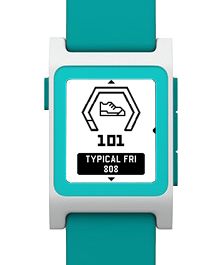
Pebble Health should be activated when you first set up your watch, and is activated (by default) on your watch with a quick press of the Up button.
If you need to set it up, just follow these quick steps:
- Open the Pebble app on your phone
- Tap the Settings menu in the bottom navigation bar.
- Scroll to the 'Health' section
- Tap ‘Enable Health’.
You’re also able to switch to metric measurements on your watch by going to Settings -> Health.
Why Pebble Health?
Pebble Health tracks your activity and sleep throughout the day. What’s so great about that? Lots of things!
All your data’s right on the watch: a quick tap of the Up button keeps you motivated by showing how you’re today’s totals compare to your typical pace.
For Pebble 2 and Time 2 users, your heart rate data provides essential insights into your overall health and stress levels. Find out how to avoid stressful situations, or drive yourself to workout harder and smarter!
Sleep’s crucial to your health, so we track that carefully, too. With just a couple clicks, you can see how you slept during the past 7 nights--so you can see just how much you deserve that quick nap! Just like activity tracking, the Pebble app shows you daily sleep, monthly sleep, and everything in between.
Frequently Asked Questions
Which watches will this work on?
- This will work on all Pebble watches except for Classic and Steel.
- For Pebble Classic and Pebble Steel we recommend users download and use third party activity trackers.
Will health info transfer between my watches if I wear one during the day and one during workouts?
- Yes, your data will be pushed from your phone to the second watch, so you can swap styles without losing data.
Does Pebble Health affect battery life?
- Pebble Health is very efficient and should use less battery than other third party fitness trackers. Please note, running two activity trackers will increase battery drain, and is not recommended.
Do I have to wear my watch for it to track my sleep?
- Yes, you will need to wear your watch throughout the night if you would like Pebble Health to track your sleep. There will be no way to accurately monitor the times that you fall asleep and wake, or the periods of light and deep sleep if your Pebble isn't on your wrist.